ad

Friday, 13 November 2015

Detect Proxy with one line of code!

There's an eays to to detect proxy by making HTTP request to sites that have open API.

For exam this site http://check.getipintel.net/check.php?ip=IP_address takes IP address as a get ip parameter's value and returnd the likelyhood of it being proxy.

For example, I'm using a proxy on purpose to see what it returns.
http://check.getipintel.net/check.php?ip=166.62.97.241

If it returns 1, it's definitely a proxy, if it returns 0, it's a regular address and if it returns something in middle, for example, 0.08 there's chances it's a proxy too! and what about 0.5? right! we really cant tell in that case.

Good part about it is you can check user for proxy in your applications and take a decision whether to allow him or not.

You can read more about it on their offical website
http://getipintel.net/

Update. Thanks to Stewart for adding good reason why you'd want to use it.
1 - Protect your site from automated XSS / SQL Injection / Brute Force / Crawlers that steal your content -- Well that's just a load of crock since they don't use proxies. Also hackers tend to go via infected computers and not proxies

2 - Serve traffic / content to real users, not bots, which reduces server load (bot detection) -- Again bots run from their own servers not via proxies

3 - Stop bots from scraping your content or bots spamming your website -- See the previous two responses

4 - Prevent trolls / people that are trying to bypass a ban -- True but then it doesn't stop dynamic IP address allocation nor just going to shops and using the countless free WiFi spots available

5 - Greatly reduce fraud on e-commerce sites (anti-fraud) -- Again not really

Collect & Validate User Emails for marketing

A simple lightweight script that allows you to collect user emails by simply locking any content that user may be after. Simply post a preview of content on the front page and link it to locked page and watch valid email addresses roll in!

It's pretty simple to use:
1. Persuade user:
[​IMG]

2. Collect the mail
[​IMG]

Make sure email's valid
[​IMG]

User clicks the email(verifying email's valid) and gains access to premium page:
[​IMG]

You can also set email info in locked.php file:
[​IMG]

In index.php file you can set page info, it's best to spend some time here to persuade user:
[​IMG]

In key_checker.php file you can set the dowload link or you can display an help page with more info as desired:
[​IMG]


Price: $3 BTC 1HbakPHgjY9sBAHudouVh31SixjhVyVdSt
Free now: http://bit.ly/1IzPHfu
little script I wrote to collect user emails. It's pesuading user and collectig their emails.
Requiremets are PHP installed server.

It's pretty simple to use:
1. Persuade user:

2. Collect the mail

Make sure email's valid

User clicks the email(verifying email's valid) and gains access to premium page:

You can also set email info in locked.php file:

In index.php file you can set page info, it's best to spend some time here to persuade user:

In key_checker.php file you can set the dowload link or you can display an help page with more info as desired:

Demo:

Price: $3 BTC 1HbakPHgjY9sBAHudouVh31SixjhVyVdSt
You get any help you may need to set it up.

Saturday, 7 November 2015

Basic Linear Search Algorithm for web scraping and many other stuff

Basic Automation Algorithm

There's plenty of techniques used in bots automation, they use different tricks and technique but the most common one is called Linear search. It's also quite useful in web scraping.

Imaging you've a page and you intend to search for certain word. Your first step would be to either convert it to array or some organized format so it can be manipulatedThere's plenty of techniques used in bots automation, they use different tricks and technique but the most common one is called Linear search. It's also quite useful in web scraping.

Imaging you've a page and you intend to search for certain word. Your first step would be to either convert it to array or some organized format so it can be manipulated
There's plenty of techniques used in bots automation, they use different tricks and technique but the most common one is called Linear search. It's also quite useful in web scraping.

Imaging you've a page and you intend to search for certain word. Your first step would be to either convert it to array or some organized format so it can be manipulated.
Basic Automation Algorithm

There's plenty of techniques used in bots automation, they use different tricks and technique but the most common one is called Linear search. It's also quite useful in web scraping.

Imaging you've a page and you intend to search for certain word. Your first step would be to either convert it to array or some organized format so it can be manipulated.
Basic Automation Algorithm

There's plenty of techniques used in bots automation, they use different tricks and technique but the most common one is called Linear search. It's also quite useful in web scraping.

Imaging you've a page and you intend to search for certain word. Your first step would be to either convert it to array or some organized format so it can be manipulated


Imaging you've a page and you intend to search for certain word. Your first step would be to either convert it to array or some organized format so it can be manipulated. There's plenty of techniques used in bots automation, they use different tricks and technique but the most common one is called Linear search. It's also quite useful in web scraping.

//Basic function declaration.
//Accepts two arguements, $array that we'll search in, and $target_word we wanna search for.
function find_word($array, $target_word) {
   
    // Here we being our basic for loop. We start 1 to 0, until i reaches arrays length, then we increment i
    for(var $i = 0; $i < $array.length; ++$i){
       
        // While looping it checks where $array[$i] <-- $i here represents a number that started from 0. And the whole expression
        // represents first array value. It it loops again, i will have value of 1 $array[1] will respresent 2nd value of array.
        // Then it checks if $array[$i] is equal the word we're looking for, if it finds the word, it will return the index or array position
        // where it was found
        if ($array[$i] == $target_word) {
            return $i;
        }
       
    }
   
    // If loop fails to find the word, it'll return -1, means it couldn't find the word.
    return -1;
}

find_word(["jon", "tom", "brown", 1, 0], "borwn");

Tuesday, 3 November 2015

How not to get your website hacked

The two most common type of attacks are:
  • SQL injection
  • XSS

SQL Injection(Senario):
  • Hacker can get access to premium section of the website
  • Can drop Database
  • Can echo all the data on screen
  • Can obviously steal confidential data and misue it
Picture from IBM

Prevention
Use PDO extention when making queries.
The PHP Data Objects (PDO) extension defines a lightweight, consistent interface for accessing databases in PHP. Each database driver that implements the PDO interface can expose database-specific features as regular extension functions. Note that you cannot perform any database functions using the PDO extension by itself; you must use a database-specific PDO driver to access a database server.

PDO provides a data-access abstraction layer, which means that, regardless of which database you're using, you use the same functions to issue queries and fetch data. PDO does not provide a database abstraction; it doesn't rewrite SQL or emulate missing features. You should use a full-blown abstraction layer if you need that facility.


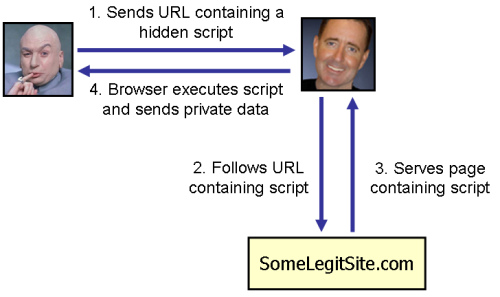
XSS(Senario):
  • Hack can steal other uses' cookies
  • Can change website look for all other uses
  • Can direct user to similar looking website
  • Can do pretty much anything that you would do with Javascript 
 Picture from moz.net

Prevention
Escape everything that you get from user, and escape everything that you display to user. This suspicious code will fail to directly execute on the browser. 

Tip: Always Encrypt your data. There's chances you may get hacked even all the preperation. You never want to give hacker access to pain data format.

Monday, 26 October 2015

PHP snippet | Format POST Array

I wrote this little functions to dumb your POST array data into a nice little table. Post associate array can be a little confusing for someone who is just starting out, if ya wanna check your submitted data in formatted table call the function dump_data();

Before:


After:


https://github.com/phpdevsami/Show-post-data-in-a-clean-table

Saturday, 24 October 2015

PHP Script | Store all $_SERVER variable data into database and retrieve


This script will stores all the data that resides in $_SERVER variable into one field in databse which can be retrived as a regular array


How to use:
To use this object instantiate the Server class and pass the required parameters. Required parameters are: ($database_object, $table_name, $field_name). This object offers two method, one to save data to databse, another to retrived saved data.

Requred variables: 
  • $id variable takes the column you are selecting.  
  • $datbase_object takes the databse object that is from database connection.
  • $table_name takes the name of the table that you want to select data from.  
  • $field_name if the name of the field in table where the server information will be or is stored 

Methods:
  • save_data() method will return true or false if data fails to insert into server, like $_Server->save_data();
  • get_data() method will return the exact array that was saved in database, from where you can either loop through it or get each value using its key like, $Server->get_data()['HTTP_HOST'] This method requires and arguement $id 

Storage:
storing server variable in database


Retrieval:
php array unserialized


https://github.com/phpdevsami/Store-SERVER-array-into-database
https://dl.dropboxusercontent.com/u/28490184/webdevtown/store%20server%20into%20db.rar

Friday, 16 October 2015

Sending POST requests with AJAX for absolute beginners

First things frst, what is AJAX?
AJAX is a client side script that communicates with server without the need to refresh the web page - in other words it works asynchronously.

Why'd I need AJAX anyways?
What about when you wanna get data from server and put it into a dable without refresh? What about when you wanna check whether username alrady exists without refresh?

How do I send a GET request with AJAX?
Use get method, and a callback function inside that takes two parameters, first returns the page, second the sucess or failed result.
To test our script out, lets create two pages, index.html and data.php, we'll send GET request to data.php from index.html page, and echo whatever is returned. I'd write something in index.php file so I can see whatever has returned.

        $.get("data.php", function(data, text){
            document.write(data);
        } );


Run the above code inside <scirpt> tags and you should see whatever was in the index.php file. That's our basic GET request done.

Q. I'm trying to load a website but it returns 301 page moved permanently?
A. The website has been moved to different URL. Read my HTTP the very basics tutorial to learn more about HTTP and headers. If website has been moved to different URL, it should generally send a Location header to your client. Try that URL.


How do I send POST request to a page?
To send a POST request use the following, pretty much same syntax as GET method but we'll add some POST data, like username and password. Basically we're going to send username and password to data.php page which has following code. Usually you'd get validate POST data and tyr matching it against user and password in SQL DB:
    if( ($_POST["username"] == "cloudcomputing") and ($_POST["password"] == "jquery") ){
        echo "Correct username and password";
    }else{
        echo "Wrong username or password";
    }


Lets send it some data from index.html page. By the way, you can read more about this method here
http://api.jquery.com/jquery.post/

Lets send username and password.
        $.post("data.php", {
            username: "loudcomputing",
            password: "jquery"
        }, function(data, result){
            document.write(data);
        });     
   

Guess what is returns? Wrong username or password. Change sending password to cloudcomputing and it'll grant the access.

So that's pretty much to it, sending basic GET or POST request is where you start and and when you're familiar with it you start adding little things to secure it.. from there on it's all trial and error and basic knowledge of how HTTP protocol works.